Rostering evidence
Turn booking demand into visible staff duties
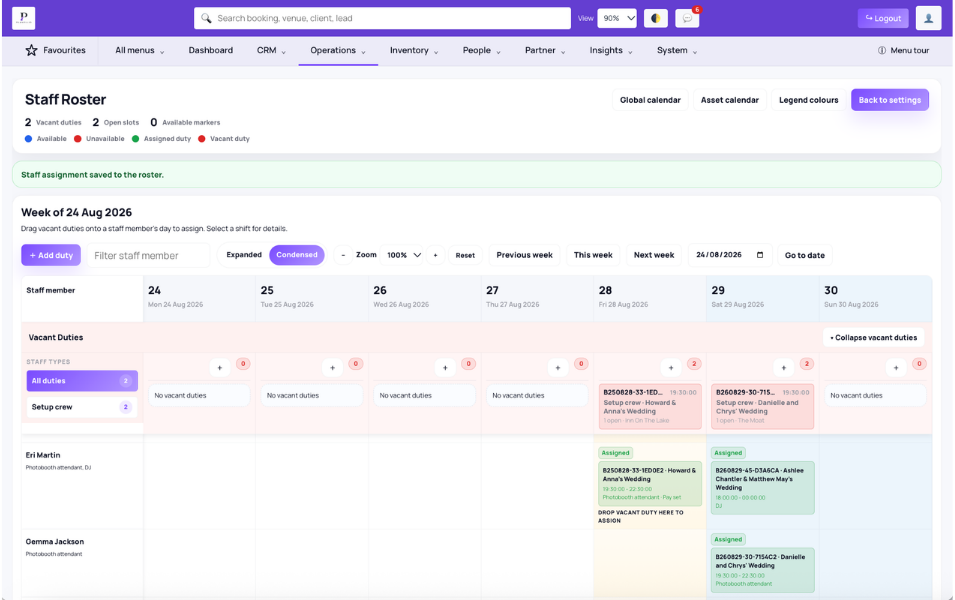
A confirmed booking is not necessarily operationally ready. Planellio can connect booked services and assets to required staff types, keep unfilled requirements visible as vacant duties and help coordinators assign suitable people before the event.
For a booking containing a DJ, photo booth and dancefloor, the operational requirement might include one DJ, one booth attendant and an installation crew. Each requirement can remain visible until the appropriate person has been assigned.
Requirements and roster
Service-linked demand feeds the staffing workflow instead of relying on a generic note saying that staff are needed.
- Staff types, employment types and rate rules
- Configurable skill groups, clusters and individual skills
- Mandatory requirements and suitability warnings
- Required roles connected to services or assets
- Assigned, unassigned and manually added duties
- Weekly drag-to-assign roster
- Dated/recurring availability, notes and leave
Assignment, interest, standby and delivery
Assignments connect a staff member to the booking, relevant service, working time, pay rule and operational information. Direct assignment fills work; expressed interest requests an open duty without filling it; standby applies after a duty is already filled.
- Direct assignment, expressed-interest and standby states
- Assigned/unassigned, interest and standby administration
- Working times and supported rate rules
- Function sheets, venue details, messages and checkpoints
- Skill-aware job board and permitted actions
- Personal one-way iCal subscriptions and directions where enabled
Staff Portal and limits
Eligible plans provide portal, agreement, completed-duty, approved-timesheet and staff-invoice workflows. Planellio is not a statutory payroll engine and does not calculate or submit PAYE, National Insurance, pension or HMRC payroll returns.
- Assigned jobs, job board and calendar
- Recurring availability and leave requests
- Timesheet modes, submission cut-offs and payday controls
- Approval/rejection, manager notes and duty pay states
- Staff invoices with duties, expenses, evidence and payment status
- Operations history and export
- No live GPS, geofenced clock-in or statutory payroll processing
Roster automation
Recorded roster changes can drive automations with operational context; simply viewing or filtering the roster does not create false change events.
- Duty create/delete and staff assign/remove triggers
- Time, note, pay and message-outcome triggers
- Before/after snapshots and changed fields
- Affected staff, role, employment and staffing-count conditions
- Scheduling, target gating and deduplication controls